> ## Documentation Index
> Fetch the complete documentation index at: https://docs.dreep.cloud/llms.txt
> Use this file to discover all available pages before exploring further.
# Signed URLs
> Generate temporary, secure links for assets in signed folders.
When an asset is uploaded to a **Signed Folder**, it cannot be accessed publicly. To allow a user to view the asset (or stream a video), your backend server must generate a temporary **Signed URL**.
This URL uses an HMAC-SHA256 signature to verify that your project authorized the request, ensuring users cannot tamper with the expiration time or guess URLs for other assets.
## URL Anatomy
A signed URL looks exactly like a public URL, but requires two additional query parameters: `exp` and `sig`.
```text theme={null}
https://cdn.dreep.cloud/api/v1/fetch/:assetId?exp=1774118400&sig=a3f9e2b1...
```
| Parameter | Type | Description |
| :-------- | :----------------------- | :--------------------------------------------------------------------------------------------------------------------------------- |
| `exp` | Unix Timestamp (seconds) | The exact time the URL expires. If the user tries to access the URL after this timestamp, it will return a 401 Unauthorized error. |
| `sig` | HMAC-SHA256 Hex | A cryptographic signature proving the URL was generated using your project's **URL Signing Secret**. |
***
## Generating Signatures
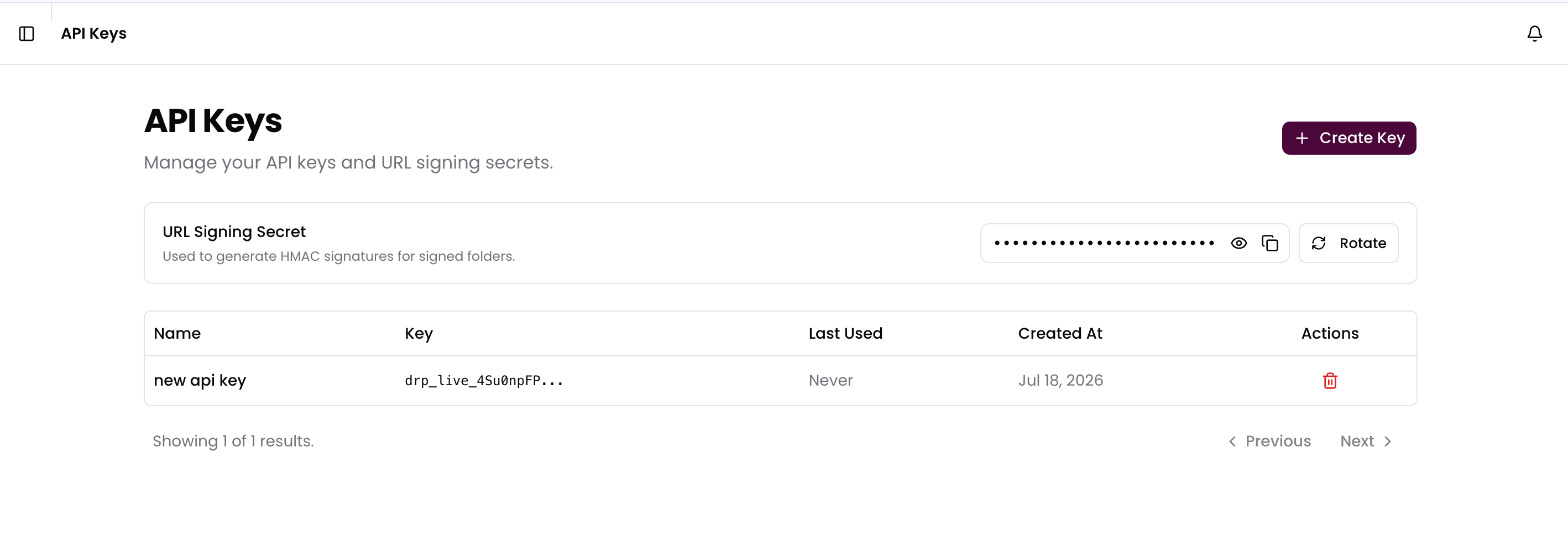
To generate a valid URL, you must create a string in the format `assetId:expires` and hash it using HMAC-SHA256 with your project's **URL Signing Secret** (found in the **API Keys** tab of your Dashboard).
The expiration time you set in your code completely overrides the folder's
`defaultExpirySeconds`. The folder's default expiry is strictly a convenience
setting used when manually generating links from the Dreep Dashboard.
### Getting Your Secret
1. Open your Dreep Dashboard and navigate to the **API Keys** page.
2. Scroll down to the **URL Signing Secret** section.
3. Click the **eye icon** to reveal the secret, or the **copy icon** to copy it directly.
4. If your secret is ever compromised, you can click **Rotate Secret** to invalidate the old one and generate a new one immediately.
 ```typescript Node.js theme={null}
import { createHmac } from "crypto";
function generateSignedAssetUrl({
assetId,
format,
expiresInSeconds = 3600, // Default 1 hour
signingSecret,
}: {
assetId: string;
format?: string;
expiresInSeconds?: number;
signingSecret: string;
}): string {
// 1. Calculate Unix timestamp
const expires = Math.floor(Date.now() / 1000) + expiresInSeconds;
// 2. Generate HMAC-SHA256 signature
const signature = createHmac("sha256", signingSecret)
.update(`${assetId}:${expires}`)
.digest("hex");
// 3. Construct URL
const ext = format ? `.${format}` : "";
return `https://cdn.dreep.cloud/api/v1/fetch/${assetId}${ext}?exp=${expires}&sig=${signature}`;
}
```
```python Python theme={null}
import hmac
import hashlib
import time
def generate_signed_asset_url(asset_id, signing_secret, expires_in_seconds=3600):
# 1. Calculate Unix timestamp
expires = int(time.time()) + expires_in_seconds
# 2. Generate HMAC-SHA256 signature
message = f"{asset_id}:{expires}".encode("utf-8")
signature = hmac.new(
signing_secret.encode("utf-8"),
message,
hashlib.sha256
).hexdigest()
# 3. Construct URL
return f"https://cdn.dreep.cloud/api/v1/fetch/{asset_id}?exp={expires}&sig={signature}"
```
```go Go theme={null}
package main
import (
"crypto/hmac"
"crypto/sha256"
"encoding/hex"
"fmt"
"time"
)
func GenerateSignedAssetUrl(assetID string, signingSecret string, expiresInSeconds int64) string {
// 1. Calculate Unix timestamp
expires := time.Now().Unix() + expiresInSeconds
// 2. Generate HMAC-SHA256 signature
message := fmt.Sprintf("%s:%d", assetID, expires)
mac := hmac.New(sha256.New, []byte(signingSecret))
mac.Write([]byte(message))
signature := hex.EncodeToString(mac.Sum(nil))
// 3. Construct URL
return fmt.Sprintf("https://cdn.dreep.cloud/api/v1/fetch/%s?exp=%d&sig=%s", assetID, expires, signature)
}
```
## Transforming Signed Media
You can safely apply image or video transformation parameters to a Signed URL. The signature only verifies the `assetId` and the `exp` timestamp—it does not lock the transformation parameters.
This means you can generate a single signed URL for an image, and the frontend can append parameters like `?width=500` or `?format=hls` dynamically without needing a new signature.
```text theme={null}
https://cdn.dreep.cloud/api/v1/fetch/2f928a.jpg?width=500&exp=1774118400&sig=a3f9e...
```
```typescript Node.js theme={null}
import { createHmac } from "crypto";
function generateSignedAssetUrl({
assetId,
format,
expiresInSeconds = 3600, // Default 1 hour
signingSecret,
}: {
assetId: string;
format?: string;
expiresInSeconds?: number;
signingSecret: string;
}): string {
// 1. Calculate Unix timestamp
const expires = Math.floor(Date.now() / 1000) + expiresInSeconds;
// 2. Generate HMAC-SHA256 signature
const signature = createHmac("sha256", signingSecret)
.update(`${assetId}:${expires}`)
.digest("hex");
// 3. Construct URL
const ext = format ? `.${format}` : "";
return `https://cdn.dreep.cloud/api/v1/fetch/${assetId}${ext}?exp=${expires}&sig=${signature}`;
}
```
```python Python theme={null}
import hmac
import hashlib
import time
def generate_signed_asset_url(asset_id, signing_secret, expires_in_seconds=3600):
# 1. Calculate Unix timestamp
expires = int(time.time()) + expires_in_seconds
# 2. Generate HMAC-SHA256 signature
message = f"{asset_id}:{expires}".encode("utf-8")
signature = hmac.new(
signing_secret.encode("utf-8"),
message,
hashlib.sha256
).hexdigest()
# 3. Construct URL
return f"https://cdn.dreep.cloud/api/v1/fetch/{asset_id}?exp={expires}&sig={signature}"
```
```go Go theme={null}
package main
import (
"crypto/hmac"
"crypto/sha256"
"encoding/hex"
"fmt"
"time"
)
func GenerateSignedAssetUrl(assetID string, signingSecret string, expiresInSeconds int64) string {
// 1. Calculate Unix timestamp
expires := time.Now().Unix() + expiresInSeconds
// 2. Generate HMAC-SHA256 signature
message := fmt.Sprintf("%s:%d", assetID, expires)
mac := hmac.New(sha256.New, []byte(signingSecret))
mac.Write([]byte(message))
signature := hex.EncodeToString(mac.Sum(nil))
// 3. Construct URL
return fmt.Sprintf("https://cdn.dreep.cloud/api/v1/fetch/%s?exp=%d&sig=%s", assetID, expires, signature)
}
```
## Transforming Signed Media
You can safely apply image or video transformation parameters to a Signed URL. The signature only verifies the `assetId` and the `exp` timestamp—it does not lock the transformation parameters.
This means you can generate a single signed URL for an image, and the frontend can append parameters like `?width=500` or `?format=hls` dynamically without needing a new signature.
```text theme={null}
https://cdn.dreep.cloud/api/v1/fetch/2f928a.jpg?width=500&exp=1774118400&sig=a3f9e...
```