

URL Anatomy
A signed URL looks exactly like a public URL, but requires two additional query parameters:exp and sig.
Generating Signatures
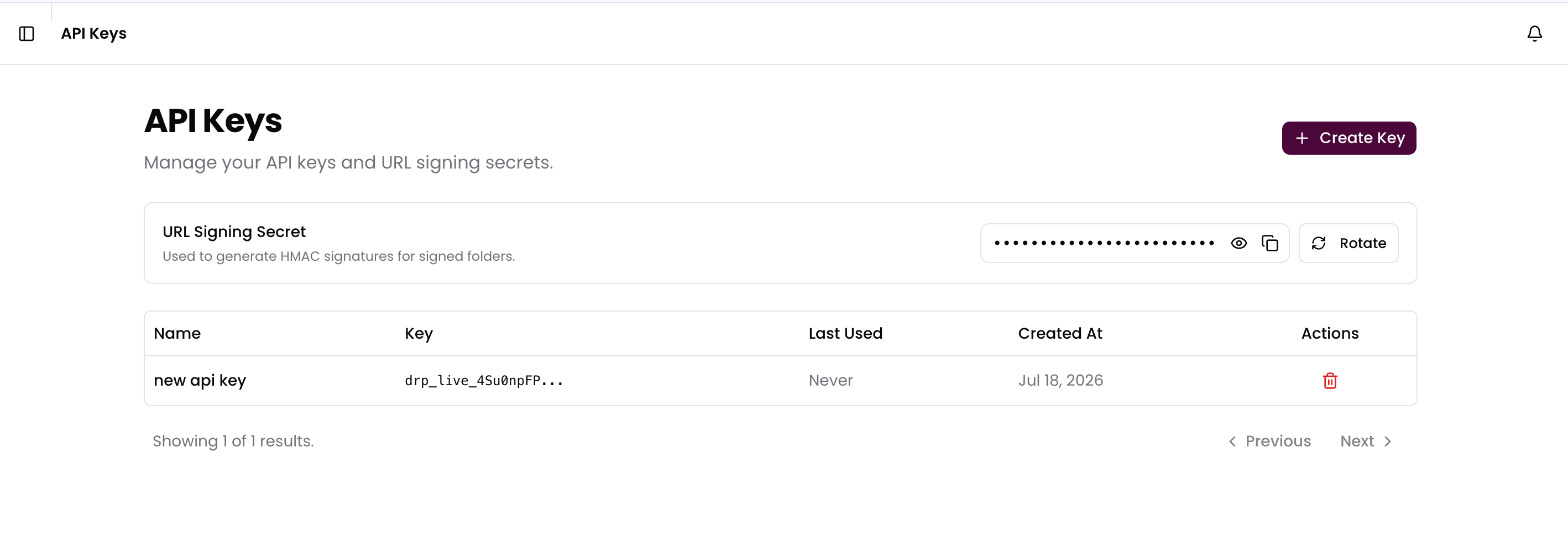
To generate a valid URL, you must create a string in the formatassetId:expires and hash it using HMAC-SHA256 with your project’s URL Signing Secret (found in the API Keys tab of your Dashboard).
The expiration time you set in your code completely overrides the folder’s
defaultExpirySeconds. The folder’s default expiry is strictly a convenience
setting used when manually generating links from the Dreep Dashboard.Getting Your Secret
- Open your Dreep Dashboard and navigate to the API Keys page.
- Scroll down to the URL Signing Secret section.
- Click the eye icon to reveal the secret, or the copy icon to copy it directly.
- If your secret is ever compromised, you can click Rotate Secret to invalidate the old one and generate a new one immediately.
Transforming Signed Media
You can safely apply image or video transformation parameters to a Signed URL. The signature only verifies theassetId and the exp timestamp—it does not lock the transformation parameters.
This means you can generate a single signed URL for an image, and the frontend can append parameters like ?width=500 or ?format=hls dynamically without needing a new signature.